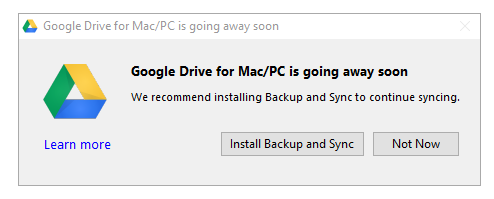
For those of us using Google Drive software on our Windows or Mac to save files from our computers and sync to Google Drive, "Google Drive for Mac / PC is going away soon". If you are still using Google Drive, you might have seen the notice when starting Google Drive desktop app. As a user, we might be wondering if Google Drive is going away completely? What happens to all the files saved on Google Drive?
Thursday, December 28, 2017
Monday, December 11, 2017
Best Free Windows Software For Renaming Files In Bulk
It is imperative that proper naming of files is important to make good used of search feature in any operating system including Windows. Very often, we see files shared to us without proper file names such as "New Document.docx" or "File01.pdf". When such files are stored on our hard drives and accumulate, it becomes more difficult to find. It is always a good practice to name files properly so that the files can be quickly searched. While that is a good way to start, if you have a lot of files to rename already, then we can use this excellent free software that will do that job. In this post, we shall see how to rename files in bulk using a free software called -Advanced Renamer.
Sunday, December 10, 2017
How to create Taxonomy term jump menu using Views in Drupal 7?
We all know Drupal uses Taxonomies - which consists of Vocabularies and Terms. Each taxonomy terms have taxonomy pages which lists all the articles tagged with that taxonomy term. Drupal Views has "Jump Menu" as Display Format, using which we can built "Jump Menu" consisting of taxonomy terms which when clicked will take use to the taxonomy term page. There is no need of installing additional modules to create Jump Lists or Jump Menu.
In this example, we shall see how to build Jump Menu of Taxonomy Terms using Views as show below:
Saturday, December 9, 2017
Free OCR (Optical Character Recognition) software for Windows
Optical Character Reader (OCR) is a software program that uses Optical Character Recognition to read specific characters on sheets and convert them to digital characters. Optical Character Reader (OCR) software can be used to convert printed data to digital data without typing, such as from scanned document. Optical Character Reader (OCR) is very useful when there is a need to digitize text from books, scanned documents etc. Once Optical Character Reader (OCR) extracts the text, the text can be copied to or saved to other text editors such as Notepad or even Microsoft Word for further editing.
Here are some Free Optical Character Reader (OCR) software for Windows Operating system
Saturday, November 25, 2017
Unable to login to phpMyAdmin in XAMPP: Access denied for user 'root'@'localhost' (using password: NO)
Unable to login to XAMPP's phpMyAdmin page : Error #1045 - Access denied for user 'root'@'localhost' (using password: NO).
In this post we shall see how to set root password for phpMyAdmin to resolve the access denied error while accessing phpMyAdmin. This may usually happen if XAMPP is reinstalled on the same computer.
Friday, November 24, 2017
Useful WordPress PLugin to resolve HTTPS insecure content and mixed content warnings on WordPress
Kilo Match
November 24, 2017
How To
HTTP
HTTPS
Useful WordPress Plugins
Website Tips
WordPress
Leave a Reply
Nowadays, most recent browsers expect websites to have HTTPS in the URL, meaning SSL certificate installed on server, which makes websites which used to be accessible over simple, insecure HTTP protocol to more secured HTTPS. In one of the previous post -I posted about "How to fix partially encrypted/mixed content errors after switching from HTTP to HTTPs (SSL)". In this post, we shall discuss particularly on "How to resolve HTTPS insecure content and mixed content warnings on WordPress Websites?"
Tuesday, November 21, 2017
How to create a WordPress Child Theme?
WordPress has tons of free and premium themes you can use for almost any kind of website. But there may be a need to do some customization here and there to fit your need. Customization should not be done on a base WordPress theme as the changes will be lost when the theme is updated to a new version. That is why it is always important to use a WordPress child theme instead. In this post we shall discuss about how to create a Child Theme in WordPress.


